How to Pay Electricity Bill Online in India – Complete Step-by-Step Guide
By Electric Bill Editorial Team | 12 min read
Last Updated : August 24, 2026
How to Pay Electricity Bill Online in India
Paying your electricity bill is a regular monthly task, but it doesn’t have to be a chore. Gone are the days when you had to stand in long queues outside the local electricity office, wasting hours just to pay your monthly dues. Today, millions of Indians prefer making their electricity bill payment online due to its unmatched convenience, speed, and security.
Whether you want to know bijli bill online kaise pay kare using popular UPI apps or directly through your state board's official website, digital payments have revolutionized the process. You can now pay from the comfort of your home, track your payment history, and even get instant receipts.
In this comprehensive beginner-friendly guide, we will walk you through exactly how to pay electricity bill online in India using various secure methods. Plus, before you pay, you can always estimate your upcoming costs using our Electric Bill Calculation guide!
What Information You Need Before Paying Electricity Bill
Before initiating an online electricity bill payment in India, you need to have a few basic details handy. Without this information, payment apps and websites won’t be able to fetch your bill amount.
- Consumer Number / Account Number / CA Number: This is the most crucial piece of information. It is a unique identification number assigned to your electricity connection. Depending on your state, it might be called a Consumer Number, Customer ID, CA Number (Contract Account Number), or BP Number. You can easily find this printed at the top center or top right of your old physical electricity bill.
- Electricity Board Name (Provider): You must know the exact name of your electricity provider (e.g., BESCOM in Bangalore, MSEDCL in Maharashtra, TNEB in Tamil Nadu, or UPPCL in UP).
- Registered Mobile Number / Email ID: Some official state websites may require you to log in or verify via OTP sent to the mobile number registered with your connection.
- Sub-division / Billing Unit (Sometimes Required): Certain boards, especially in rural areas, might ask for a 2-to-4 digit subdivision code along with your consumer number.
How to Pay Electricity Bill Through Official Board Website
Almost every state electricity board and DISCOM provider in India provides a secure online portal for payment. This method is highly recommended if you want to avoid third-party app convenience fees and instantly download an official PDF receipt.
Follow these simple steps:
- Open Your Electricity Board Website: Search for your provider on Google (e.g., "TNEB online payment" or "UPPCL bill pay") and click on the official government website (usually ending in .gov.in or .in).
- Navigate to the 'Quick Pay' or 'Bill Payment' Section: Most websites have a direct link on the homepage that says "Pay Bill Online" or "Quick Pay" where no login is required.
- Enter Your Details: Type in your Consumer Number (or Account ID) and solve the captcha code if prompted.
- View Bill Details: Click 'Submit' or 'Fetch Bill'. The screen will display your name, bill amount, and due date. Always verify the name to ensure you are paying for the correct meter!
- Select Payment Method: Choose your preferred payment gateway. You can typically pay via Credit Card, Debit Card, Net Banking, or UPI.
- Complete Payment: Enter your banking details or scan the UPI QR code to complete the transaction securely.
- Download Receipt: Once successful, a confirmation page will appear. Always click on "Download Receipt" or "Print" and save the PDF for your records.
How to Pay Electricity Bill Using Mobile Payment Apps
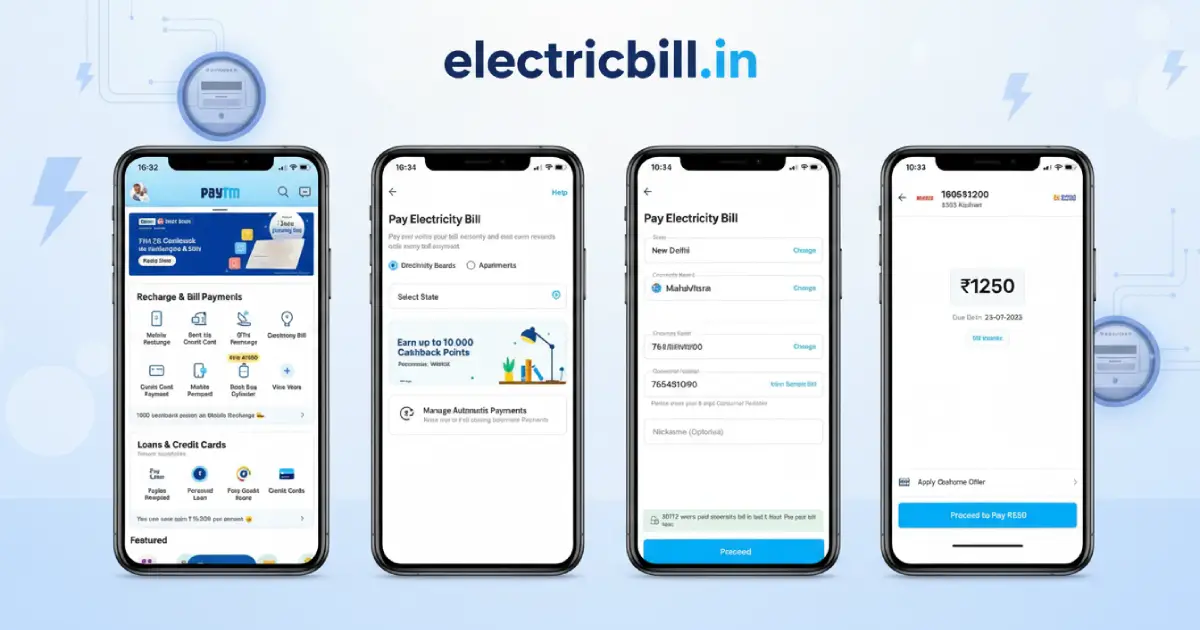
The fastest way to pay your bill today is through mobile UPI apps. If you are wondering how to pay electricity bill using phonepe, google pay, or paytm, the process is fundamentally the same across all platforms. These apps are fast, secure, and maintain your payment history.
Using Google Pay (GPay)
- Open the Google Pay app.
- Scroll down to the 'Bills, Recharges and more' section and tap on Electricity.
- Select your electricity board from the list (or use the search bar).
- Link your account by entering your Consumer Number.
- GPay will instantly fetch your current pending bill amount.
- Tap 'Pay', enter your UPI PIN, and the payment is done!
Using PhonePe
- Open the PhonePe app.
- Under the 'Recharge & Pay Bills' section, click on Electricity.
- Choose your state or search for your electricity provider.
- Enter your unique Consumer ID/CA Number.
- Verify the billed amount and the customer name on the screen.
- Proceed to pay using your linked bank account via UPI.
Using Paytm
- Launch the Paytm app.
- Tap on Electricity Bill on the home screen.
- Select your State and then select your Electricity Board.
- Enter your Consumer Number and tap 'Proceed'.
- Check the bill amount. Paytm also allows you to apply promo codes for cashback here.
- Pay using Paytm Wallet, UPI, or Debit/Credit Card.
An added advantage of using these apps is that they will automatically notify you next month when your new bill is generated, acting as an excellent due-date reminder.
How to Check Electricity Bill Online Before Paying
Sometimes you just want to know how to check electricity bill online without immediately paying it. This is useful for verifying your consumption, checking the due date to avoid late fees, or downloading a copy of the bill for address proof.
To check your bill:
- Via Official Website: Go to your state electricity board's portal, find the "View Bill" or "Know Your Bill" option. Enter your consumer ID. You will be able to view a detailed breakdown of your charges, tariffs, and previous meter readings. Most portals allow you to download a PDF copy of the exact bill that is sent to your home.
- Via UPI Apps: If you have already linked your consumer number to GPay, PhonePe, or Paytm, simply opening the app and tapping on the 'Electricity' section will instantly show you whether a bill is pending, the exact amount, and the last date to pay.
- Via WhatsApp/SMS Services: Many progressive DISCOM providers now offer WhatsApp chatbot services. By sending a 'Hi' from your registered mobile number to their official WhatsApp business account, you can instantly get your current bill amount and a PDF copy right in your chat.
Common Electricity Boards in India
India has a mix of state-owned electricity boards and private DISCOM (Distribution Company) providers. Regardless of who supplies power to your house, almost every provider is now integrated into the Bharat Bill Payment System (BBPS), making online payments universally accessible.
Some of the largest boards where you can make an online electricity bill payment in India include:
- Maharashtra: MSEDCL (Mahavitaran), Adani Electricity, Tata Power
- Uttar Pradesh: UPPCL (Urban & Rural)
- Tamil Nadu: TANGEDCO (TNEB)
- Karnataka: BESCOM, MESCOM, HESCOM
- Delhi: BSES Rajdhani/Yamuna, Tata Power DDL
- West Bengal: WBSEDCL, CESC
No matter which state you reside in, the fundamental process of finding your consumer number and paying via an app or website remains identical.
Benefits of Paying Electricity Bill Online
Still wondering why you should make the switch to digital payments? Here are the top benefits:
No Office Visits
Save hours of your time. No need to travel to the billing counter, stand in the sun, or deal with restricted office timings. Pay at midnight or on a Sunday from your sofa.
Instant Confirmation
Your payment is updated with the electricity board almost instantly (or within a few hours). You receive immediate SMS/email confirmations.
Digital Receipt & History
Never lose a paper receipt again. Apps and official websites maintain a complete history of your paid bills, which is highly useful when submitting address proofs.
Automated Reminders
Once you link your account to an app like PhonePe or GPay, you will get notifications before the due date, ensuring you never pay late fees again.
Safety Tips for Online Electricity Bill Payment
While online payments are highly secure, digital fraud is a reality. Stay safe by following these fundamental guidelines:
- Use Official Channels Only: Always use trusted apps (GPay, PhonePe, Paytm, Amazon Pay) or the official state board website. Do not download random billing apps from unknown links.
- Beware of Fake SMS / WhatsApp Messages: A very common scam in India is receiving an SMS saying: "Your electricity power will be disconnected tonight at 9 PM. Call this number immediately." Never call these numbers. Electricity boards NEVER send such threatening disconnection messages from personal 10-digit mobile numbers.
- Never Share OTP or UPI PIN: Remember, your UPI PIN is only required when YOU are sending money, never for receiving. Board officials will never ask for your passwords or OTPs.
- Verify Name Before Paying: Always double-check the customer name displayed on the screen before entering your PIN to ensure you haven't typed the wrong consumer number.
What to Do If Electricity Bill Payment Fails
Occasionally, due to bank server issues or network drops, your money may be deducted from your bank account but the bill status still shows as "Unpaid." Do not panic! This is common and entirely resolvable.
- Wait for 24-48 Hours: If you paid via a UPI app, the bank server usually takes 2-3 working days to either process the payment to the biller or automatically refund the amount back to your account.
- Check Bank Statement: Verify if a reversal (refund) has already occurred in your bank account.
- Raise a Dispute on the App: If the money hasn't returned after 3 days, go to the 'History' tab of PhonePe/GPay/Paytm, find the transaction, and click on "Contact Support" or "Raise Issue."
- Do Not Pay Again Immediately: Unless tomorrow is the absolute final due date, wait for the status of the first transaction to clear before attempting to pay a second time.
Frequently Asked Questions
- Can I pay electricity bill using UPI?
Yes, absolutely. UPI has become the most popular method for paying electricity bills online in India. You can use any UPI-enabled app like Google Pay, PhonePe, Paytm, BHIM, or your bank's official app. - Is online electricity bill payment safe?
Yes, paying online through official board websites or reputed apps like GPay and Paytm is highly secure. They use encrypted banking networks like BBPS (Bharat Bill Payment System) established by the NPCI. Just ensure to avoid clicking on suspicious links sent via SMS. - Can I download electricity bill receipt offline?
Yes. If you pay through the official state website, you get a PDF receipt immediately. If you pay via an app, you can view the transaction ID and digital receipt in the app's history, which serves as a valid proof of payment. - What happens if I miss the due date?
If you miss the due date, your electricity board will add a late payment surcharge (penalty) to your next month's bill. If left unpaid for an extended period, the provider has the right to temporarily disconnect your power supply. You can still pay the overdue bill online, and the late fee will be included. - How long does it take for an online payment to reflect?
In most cases involving the BBPS system or major UPI apps, the payment reflects instantly. However, on some official state portals or during server maintenance, it might take 24 to 48 hours for your account balance to update to 'Paid'.
Conclusion
Embracing online electricity bill payment is one of the smartest ways to simplify your life. It is fast, secure, provides an accurate history of your expenses, and most importantly, saves you from the hassle of late fees through automated reminders.
Whether you choose to pay using mobile apps like PhonePe, Paytm, Google Pay, or directly via your state's electricity board website, the process takes barely two minutes once you have your Consumer Number ready.
Want to take even more control of your power bills? Before your bill arrives next month, use our comprehensive Electric Bill Calculator module to estimate your exact charges based on your current meter reading!